Excel 2007 has a few handy functions to find what cell's you have used in a formula. The quickest and simplest method is through the ribbon. On the formulas tab, above the heading Formula Auditing, you'll find Trace Precedents and Trace Dependents.
Precedents affect the value of the currently selected cell.
Dependents are those cells affected by the currently selected cell.
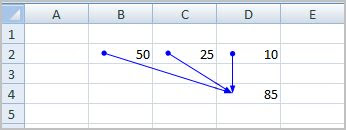
In the example below I have summed the values B2:D2 in cell D4. If I select D4 and click Trace Precedents, Excel will display blue arrows from the cells that affect the formula in this one. This can be a great help when you are dealing with a lot of data on the sheet.
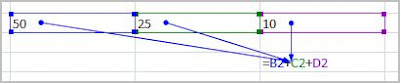
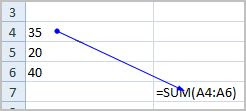
Determining dependents is just as simple. Below, I have select cell A4 and clicked Trace Dependents. A blue arrow appears from A4 to let me know that the formula in B7 is dependent upon this cell.
Tracing cell precedents and dependents can be a great way to view the relationships between values and quickly identify any origiins of errors.
Determining dependents is just as simple. Below, I have select cell A4 and clicked Trace Dependents. A blue arrow appears from A4 to let me know that the formula in B7 is dependent upon this cell.
Tracing cell precedents and dependents can be a great way to view the relationships between values and quickly identify any origiins of errors.